Getting started
dagster-slurm lets the same Dagster asset run locally during development and on a Slurm cluster in production.
A European sovereign GPU cloud does not come out of nowhere. Maybe this project can support making HPC systems more accessible.
Why dagster-slurm
Configure once, then materialize. dagster-slurm transfers the payload from your current checkout, provides the environment captured by the Pixi lockfile, submits the job, and returns its logs and status to Dagster. You do not need a manual ssh, scp, environment activation, and sbatch loop for every run.
Iterate locally. Developers and coding agents can run the same asset without SSH or Slurm for rapid feedback, then change the compute configuration when it is ready for the cluster.
Keep HPC controls.
- Logs, Slurm state, CPU efficiency, memory, elapsed time, and node-hours appear in Dagster.
- Assets can use different environments, launchers, and resource requirements.
- Separate
ComputeResourceinstances can target different clusters. - Run-scoped Ray can reuse one allocation. Shared-allocation sessions and heterogeneous (HET) jobs are experimental; see Execution modes.
Before, during, and after HPC
An HPC job is one stage in a Dagster asset graph, not the whole pipeline:
- Before: ingest and validate data where it lives.
- During: send only the compute-heavy assets to Slurm.
- After: aggregate, publish, and serve the results.
Prerequisites
- pixi (
curl -fsSL https://pixi.sh/install.sh | sh) pixi global install git- Docker (or compatible runtime) with the
docker composeplugin available
Fetch the repository
git clone https://github.com/ascii-supply-networks/dagster-slurm.git
cd dagster-slurm
cd examples
1. Kickstart (locally--no Slurm)
For rapid iteration, execute assets directly on your workstation:
pixi run start
Navigate to http://localhost:3000 to view the Dagster UI with assets running in-process.
Using Dagster UI
To understand the benefits of using Dagster with Slurm, open the Dagster UI and navigate to the Assets tab. Here, you’ll see the different assets that can be materialized (i.e., executed).
For this example, select the asset process_data, which is a dummy asset that doesn’t actually process any data.
Once it’s materialized, go to the Runs tab and open the newly created run.
In the Run view, you can explore detailed output and run information (see screenshot below). For example, you can check the input path, output logs, number of processed rows, and total processing time.
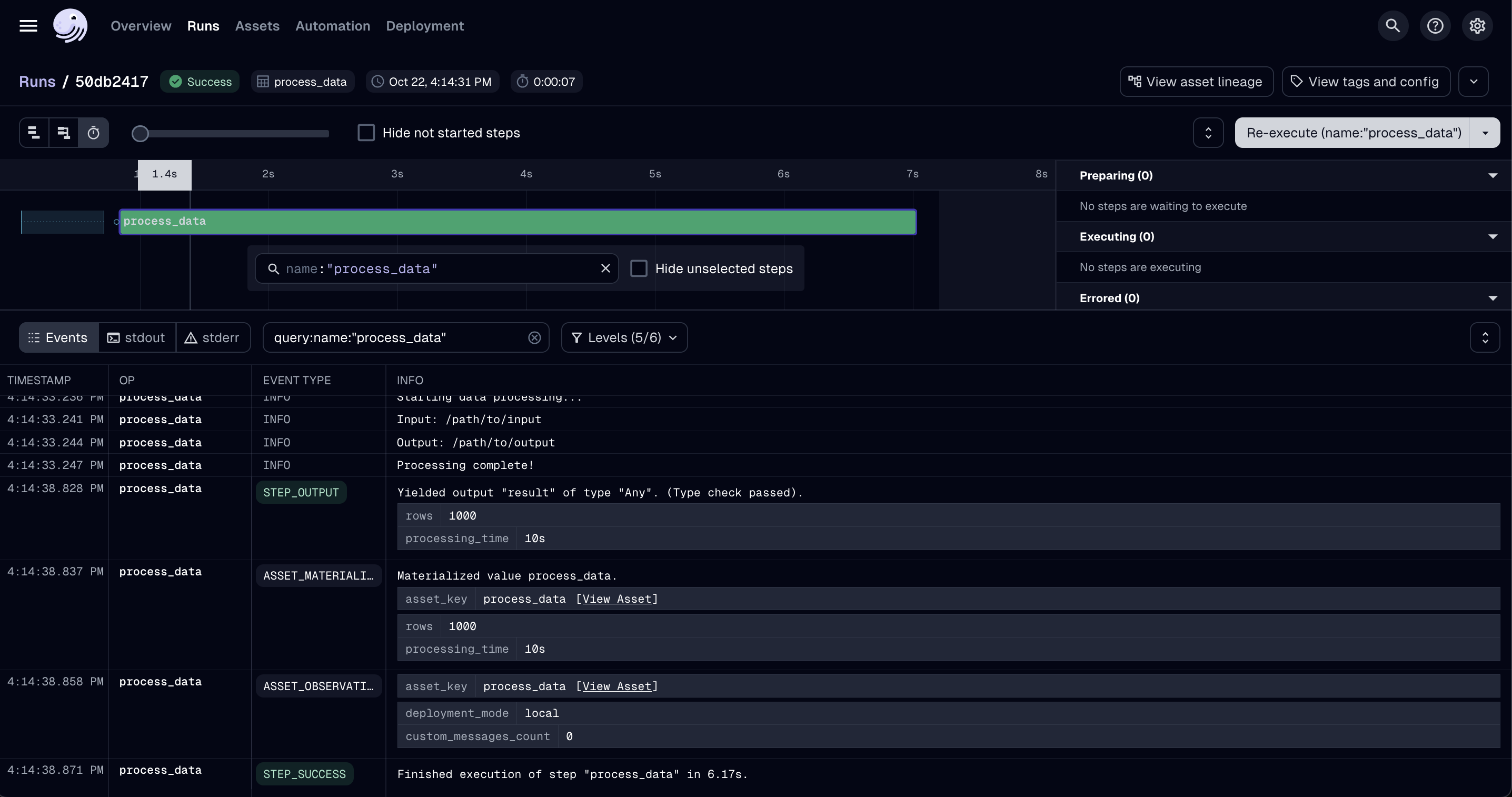
Under the stderr and stdout tabs, Dagster automatically collects the respective logs.
This feature is especially useful when working with Slurm, where you would otherwise need to manually log into the compute machine to locate the individual output files.
With Dagster, all logs are centralized, making them easy to access, compare, and troubleshoot.
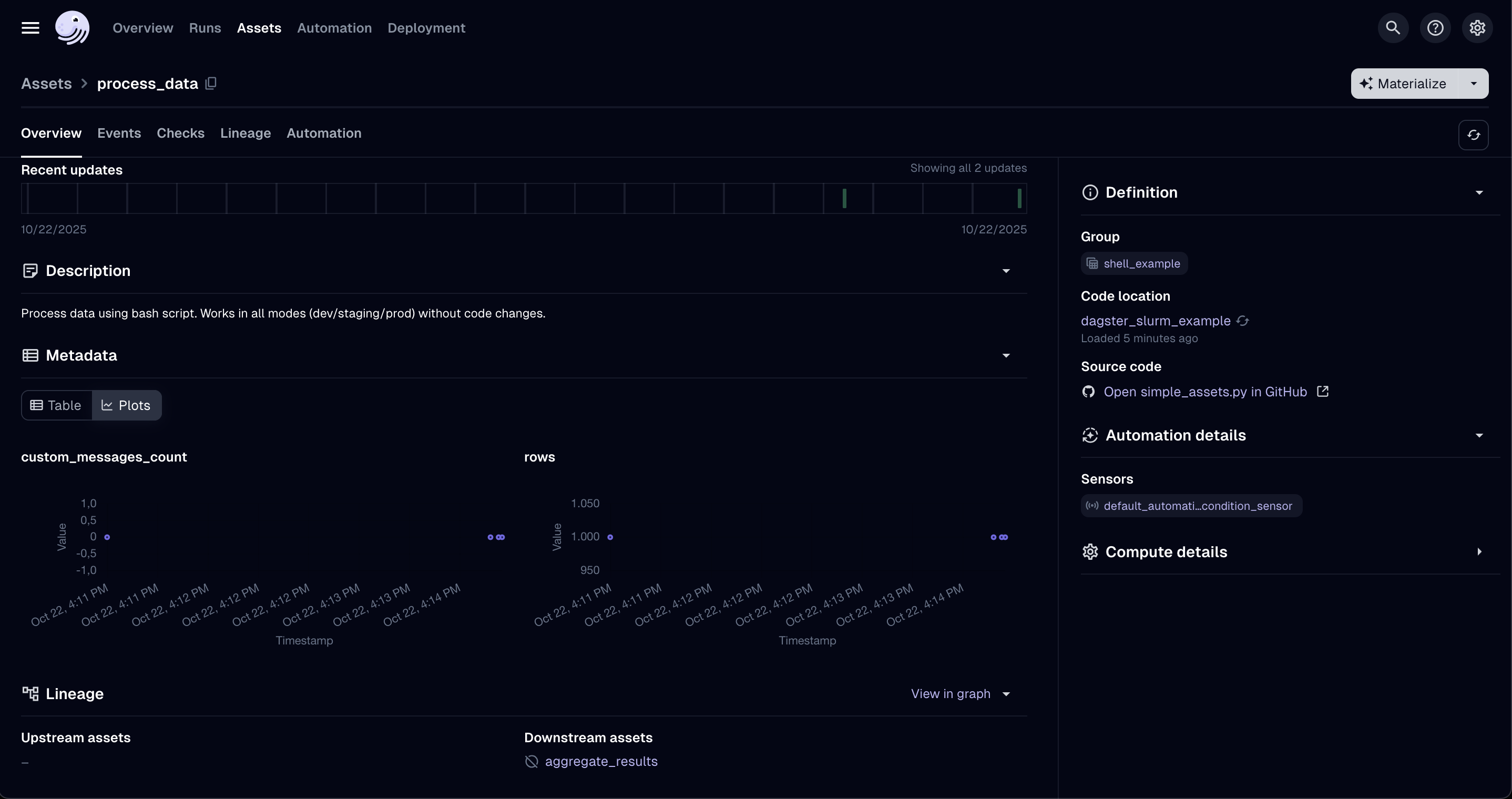
To further explore your asset runs, return to the Assets tab and select process_data again. Here, you can review all past runs of that asset, compare their performance, and analyze trends across executions (see screenshot below). Depending on your Dagster configuration, you can also log and visualize additional metrics or properties.
2. Validating with a Docker as your Cluster
You can run the full Slurm code without touching a real supercomputer by setting up a docker environment. This repository ships a Docker Compose stack for that. Create a .env file in examples/ with the Docker cluster's default credentials:
SLURM_EDGE_NODE_HOST=localhost
SLURM_EDGE_NODE_PORT=2223
SLURM_EDGE_NODE_USER=submitter
SLURM_EDGE_NODE_PASSWORD=submitter
SLURM_DEPLOYMENT_BASE_PATH=/home/submitter/pipelines/deployments
Then start the cluster and point Dagster at it:
docker compose up -d
cd examples
pixi run start-staging
Navigate to http://localhost:3000 again. You can also SSH to your running docker container, and check the Slurm queue with squeue -u submitter and sacct -u submitter.
ssh -p 2223 submitter@localhost
squeue -u submitter
sacct -u submitter
3. Point to your own HPC cluster
- Update the SSH and Slurm configuration in
examples/projects/dagster-slurm-example/dagster_slurm_example/resources/__init__.py, or create the.envfile inexamples/with the connection details for your cluster as we did for the docker example (or use any of your own equivalent module). - Provide the connection details via environment variables—
dagster-slurmreads them at runtime so you can keep secrets out of the repository.
Required environment variables
| Variable | Purpose | Notes |
|---|---|---|
SLURM_EDGE_NODE_HOST | SSH hostname of the login/edge node. | - |
SLURM_EDGE_NODE_PORT | SSH port. | Defaults to 22 on most clusters. |
SLURM_EDGE_NODE_USER | Username used for SSH and job submission. | Often tied to an LDAP or project account. |
SLURM_EDGE_NODE_PASSWORD / SLURM_EDGE_NODE_KEY_PATH (optional) | Authentication method. | Prefer key-based auth. Leave both unset to let ssh-agent and ~/.ssh/config decide. |
SLURM_EDGE_NODE_FORCE_TTY (optional) | Request a pseudo-terminal (-tt). | Set to true on clusters that insist on interactive sessions. Leave false when using a jump host. |
SLURM_EDGE_NODE_POST_LOGIN_COMMAND (optional) | Command prefix run immediately after login. | Supports {cmd} placeholder; useful when you cannot use ProxyJump. |
SLURM_EDGE_NODE_JUMP_HOST / _USER / _PORT / _PASSWORD (optional) | Configure an SSH jump host (uses ssh -J). | Lets you hop via vmos/bastion nodes; password-based auth is supported. |
SLURM_EDGE_NODE_HOST_KEY_CHECKING (optional) | strict (default), accept-new, off, or inherit. | Use off only for disposable test clusters; inherit defers to ~/.ssh/config. |
SLURM_EDGE_NODE_KNOWN_HOSTS_FILE (optional) | SSH/SCP known-hosts file. | Defaults to ~/.ssh/known_hosts; off uses /dev/null. |
SLURM_EDGE_NODE_BATCH_MODE (optional) | true (default), false, or inherit. | inherit lets OpenSSH prompt, e.g. for a key passphrase. |
SLURM_DEPLOYMENT_BASE_PATH | Remote directory where dagster-slurm uploads job bundles. | Should be writable and have sufficient quota. |
SLURM_PARTITION | Default partition/queue name. | Override per asset for specialised queues. |
SLURM_GPU_PARTITION (optional) | GPU-enabled partition. | Useful when mixing CPU and GPU jobs. |
SLURM_SIGNAL_BEFORE_TIMEOUT (optional) | Signal and lead time, e.g. TERM@120. | Sends --signal=B:TERM@120 to the batch shell. |
SLURM_QOS (optional) | QoS or account string. | Required on clusters that enforce QoS selection. |
SLURM_SUPERCOMPUTER_SITE (optional) | Enables site-specific overrides (vsc5, leonardo, …). | Adds TTY/post-login hops or queue defaults. |
DAGSTER_DEPLOYMENT | Selects the resource preset (development, staging_docker, production_supercomputer, …). | See Environment enum in the example project. |
CI_DEPLOYED_ENVIRONMENT_PATH (production only) | Path to a pre-built environment bundle on the cluster. | Required when using production_supercomputer. |
DAGSTER_SLURM_SSH_CONTROL_DIR (optional) | Directory for SSH ControlMaster sockets. | Override when /tmp is not writable; defaults to ~/.ssh/dagster-slurm. |
Note: Some clusters (including VSC-5) forbid SSH ControlMaster sockets. When that happens
dagster-slurmautomatically switches to one-off SSH connections so jobs keep running—there’s no extra configuration needed, although log streaming may be slightly slower. SetDAGSTER_SLURM_SSH_CONTROL_DIRif your security policy restricts where control sockets can live.
Execution modes
ComputeResource currently supports two stable execution modes:
| Mode | Description | Typical use |
|---|---|---|
local | Runs assets without SSH or Slurm. | Developer laptops and CI smoke tests. |
slurm | Submits one Slurm job per asset execution by default. Ray assets can opt into one run-owned allocation with allocation_scope="run". | Staging clusters and production deployments today. |
Heterogeneous job submissions (
slurm-hetjob) are still experimental. Run-scoped allocation is currently Ray-focused and requires all participating assets to share one allocation shape.
Launchers (Bash, Ray, Spark—WIP, or custom) can be chosen globally or per asset to fit your workload.
Staging vs. production modes
| Mode | Environment packaging | Typical use case |
|---|---|---|
staging_supercomputer | Builds/publishes pixi environments on demand for each run. Startup is slower, but ideal while iterating or validating new dependencies. | Dry runs, QA, exploratory workloads. |
production_supercomputer | Expects a pre-deployed environment (referenced via CI_DEPLOYED_ENVIRONMENT_PATH). Launches quickly because the runtime is already present on the cluster. | Business-critical pipelines that require deterministic runtimes. |
In practice, use staging while developing or testing new packages, then promote the bundle via CI and switch the deployment to production once the artifact is published.
To confirm the job landed on the expected queue, open an interactive shell on the cluster and run squeue -j <jobid> -o '%i %P %q %R %T'. The Partition, QoS, and Reservation columns should match your .env overrides.
API examples
Control plane (Dagster asset)
This code lives in your Dagster deployment (e.g. local-data-stack):
import dagster as dg
from dagster_slurm import ComputeResource


@dg.asset
def process_data(
    context: dg.AssetExecutionContext,
    compute: ComputeResource,
):
    """Simple dagster-slurm example asset."""
    script_path = dg.file_relative_path(
        __file__,
        "../../../../dagster-slurm-example-hpc-workload/dagster_slurm_example_hpc_workload/shell/myfile.py",
    )
    completed_run = compute.run(
        context=context,
        payload_path=script_path,
        extra_env={"KEY_ENV": "value"},
        extras={"foo": "bar"},
    )
    yield from completed_run.get_results()
User plane (remote workload)
import os
from dagster_pipes import PipesContext, open_dagster_pipes


def main() -> None:
    context = PipesContext.get()
    context.log.info("Starting data processing...")
    context.log.debug(context.extras)
    key_env = os.environ.get("KEY_ENV")
    context.log.info(f"KEY_ENV: {key_env}")
    context.log.info(f"foo: {context.extras['foo']}")

    result = {"rows_processed": 1000}
    context.report_asset_materialization(
        metadata={
            "rows": result["rows_processed"],
            "processing_time": "10s",
        }
    )
    context.log.info("Processing complete!")


if __name__ == "__main__":
    with open_dagster_pipes() as context:
        main()
Resource configuration
Configuration snippets for local, Docker-backed Slurm, and real HPC clusters are maintained in the example project resources module. Adapt those templates to match your SSH endpoint, partitions, and queue limits.